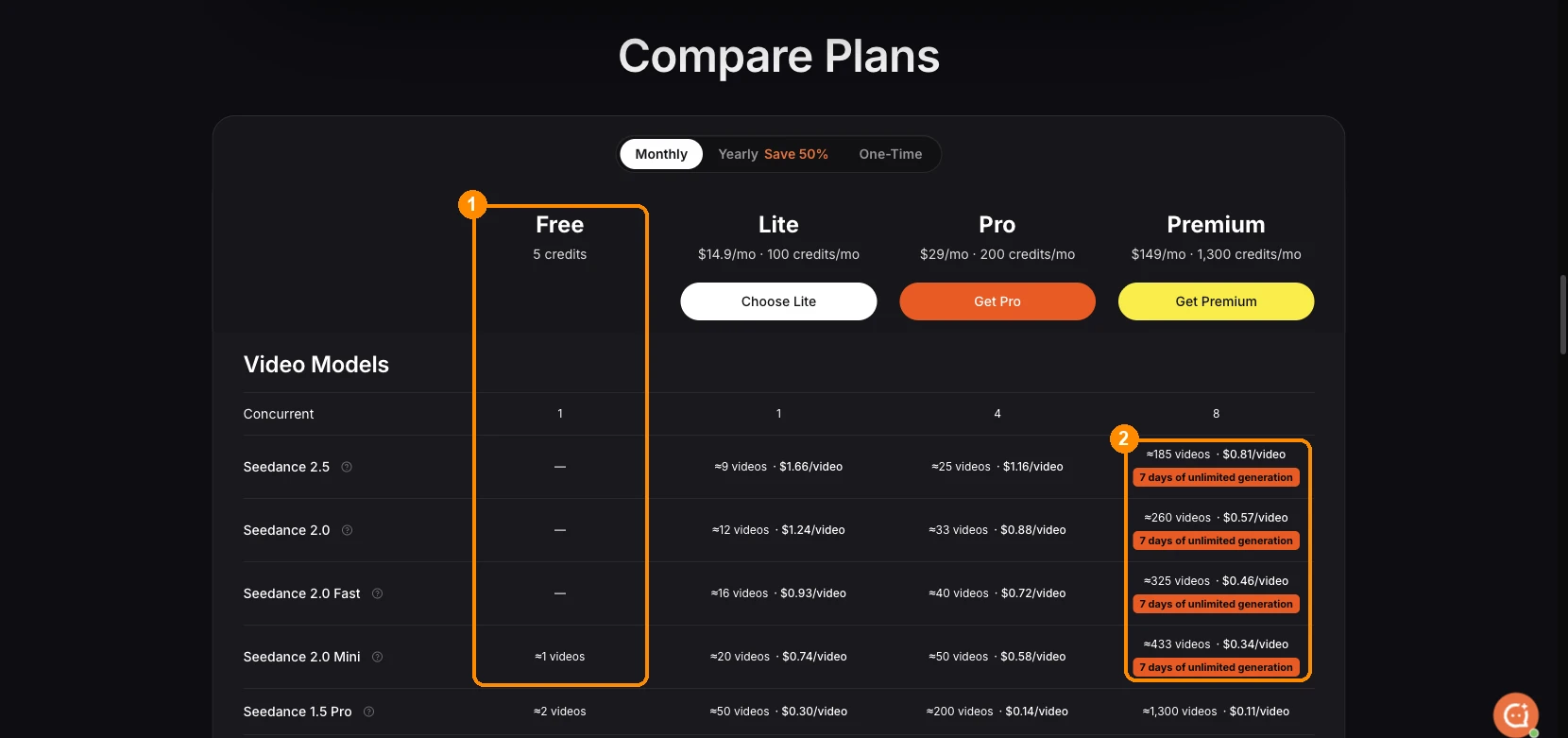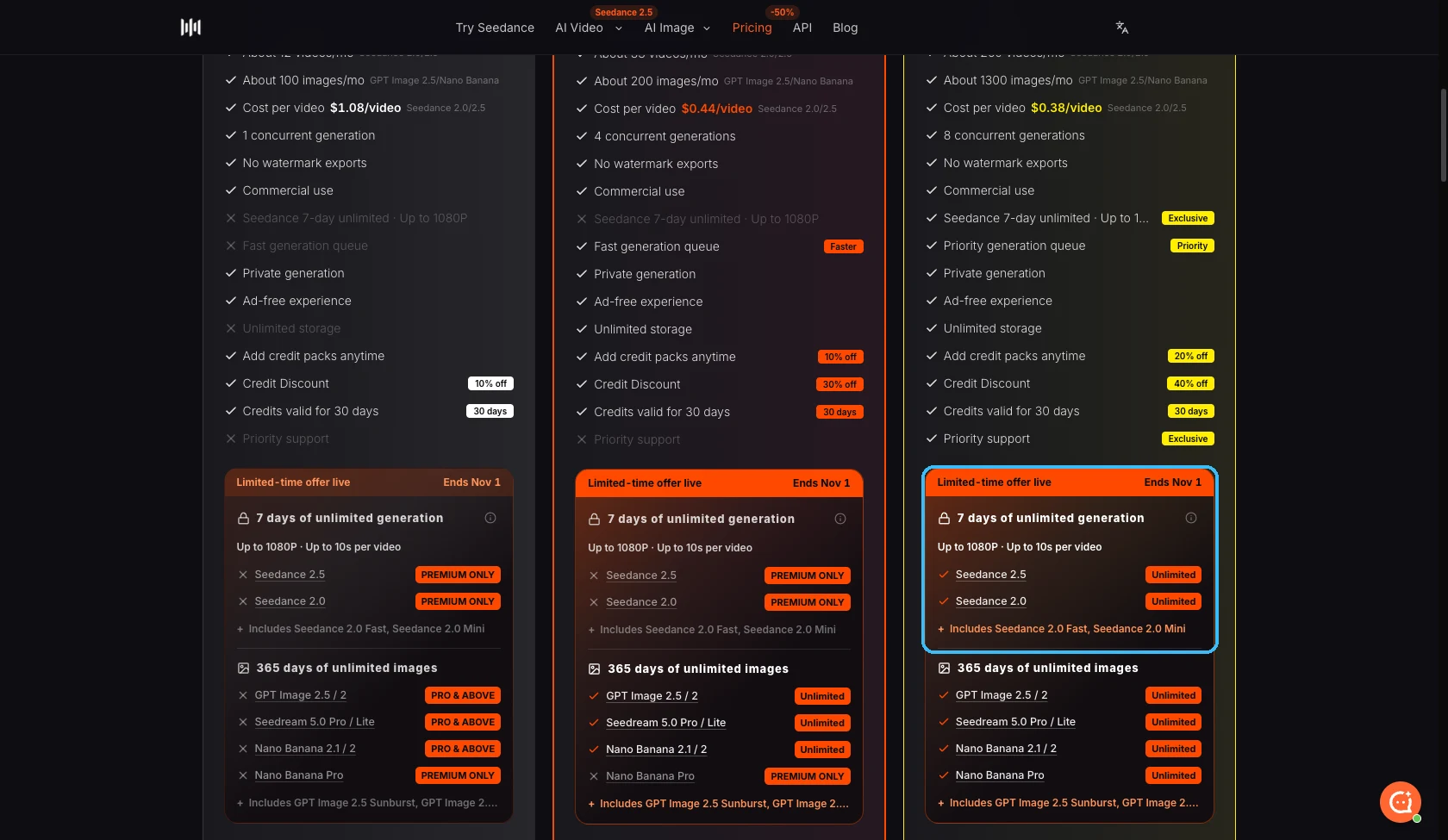
Unlimited mode lets you keep creating with selected models without spending your purchased credits. Pro and Premium include eligible image generation while the subscription is active. Your first qualifying Premium subscription also includes seven consecutive days of eligible Seedance videos.
The useful question is not just “is it unlimited?” It is which model you can use, which settings are included, how long the benefit lasts, and what happens when a job needs to wait. This guide covers those details so you can choose the right plan before paying.
Compare plans and current offers
The short answer, by plan
| Plan | Unlimited images | Unlimited videos | Credits included |
|---|---|---|---|
| Lite | Not included | Not included | 300 credits on the base plan |
| Pro | Eligible GPT Image 2 generations while the subscription is active | Not included | From 600 credits |
| Premium | Eligible GPT Image 2 generations while the subscription is active | Seven days of eligible Seedance 2.0 Mini generations, once per account | From 3,500 credits |
| One-time credit pack | Not included | Not included | The amount shown on the selected pack |
Unlimited mode and credits are separate ways to create. Your subscription credits remain available for supported models and settings outside the unlimited offer. Buying a credit pack adds credits; it does not start or extend a subscription benefit.
The current pricing page shows the available plan sizes, checkout total and active offers. Choose the amount of credits you expect to use, then check whether the unlimited settings below fit the work you want to make.
What “unlimited” includes
The benefit applies to a defined set of generations, rather than every model in the catalog.
| Benefit | Included model | Included settings | Not included |
|---|---|---|---|
| Unlimited video | Seedance 2.0 Mini | 4 seconds, 480p, no reference files | Seedance 2.5, longer clips, higher resolutions, image or video references, and upscaling |
| Unlimited image | GPT Image 2 | Standard 1K output, medium quality, opaque background, no reference files | High-quality output, transparent backgrounds, reference images, and upscaling |
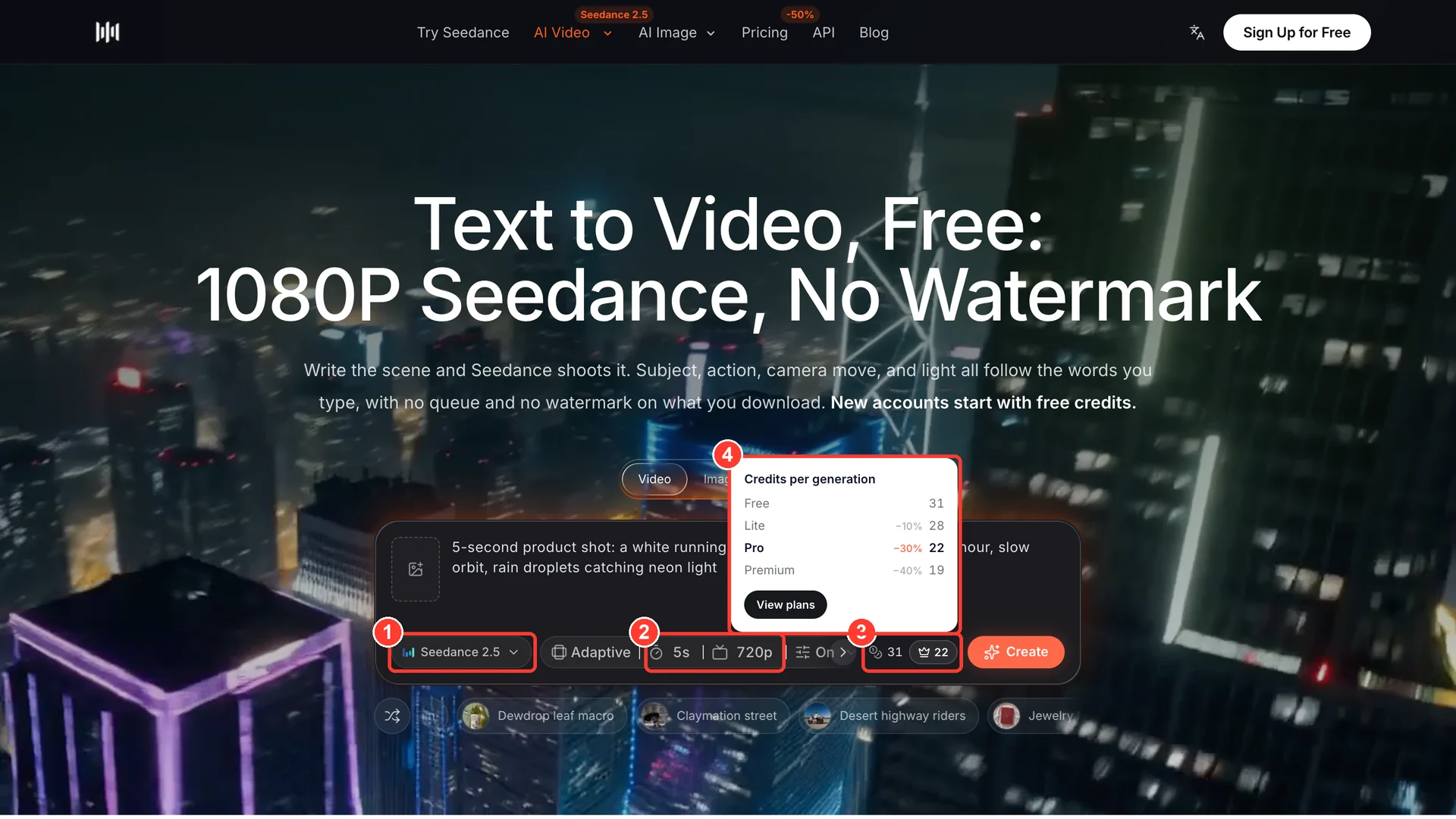
If you change to a model or setting outside the offer, the generator shows its ordinary credit price. Check the selected mode and the Create button before submitting. Unlimited mode never silently converts a job into a paid-credit generation.
This makes the offer useful for trying short video ideas, testing compositions, exploring prompts and making image variations from text. Use credits when the brief requires a particular model, a reference asset, longer motion, a larger output, or another setting that is not included.
When the benefit starts and ends
Video: the seven-day window starts with the account’s first qualifying Premium subscription purchase. It runs for seven consecutive days. It does not pause when you close the site or take a day off, and renewing or purchasing Premium again does not restart it. The subscription must remain eligible while the benefit is used.
Images: Pro and Premium include the eligible image mode while the paid subscription is active. This is an active-membership benefit, not a separate promise of 365 days of access after any purchase. A one-time pack does not activate it.
Turning off subscription renewal does not immediately end the period already paid for. Refunding or reversing a purchase can end the associated benefits. Check your billing settings for your paid-through date and your subscription status.
A waiting task still needs valid eligibility when it is ready to start. If the video window or paid entitlement ends while it is waiting, it cannot start as an unlimited generation. You can choose to continue with credits if the same workflow is available in credit mode.
How the queue and fair-use limits work
Unlimited mode runs one generation at a time per account, with room for one additional waiting task. Images and videos share that concurrency limit, but have separate usage capacity: using the video allowance does not consume the image allowance.
The service applies rolling usage limits and cooldowns to keep the offer available fairly. Video usage is spread across its seven-day window. Image usage is also subject to rolling limits. A busy service, repeated generation, or reaching the available capacity can increase the wait or temporarily pause new unlimited jobs. Unlimited describes the eligible generation benefit; it does not mean guaranteed instant processing or unrestricted throughput.
The waiting state shows when the task can next become eligible to run. That time is an estimate of availability, not a guaranteed finish time. A model provider can have its own queue after submission, and more complicated prompts can take longer to render.
While a task is waiting, you can:
- Leave it in unlimited mode and wait for capacity.
- Cancel it if you no longer need the result.
- Choose Use credits, review the current credit quote, and confirm to use the ordinary generation route.
Switching to credits skips our unlimited queue; it cannot remove a model provider’s own processing time. Nothing is deducted just because the free queue becomes longer. Avoid submitting the same prompt repeatedly to try to move forward: extra attempts do not create additional unlimited processing slots.
Monthly, yearly and one-time purchases
The base plans currently have the following prices. Larger Pro and Premium credit allowances are selectable on Pricing; the checkout summary is the final quote for the option you choose.
| Base plan | Monthly billing | Yearly billing | Base credit allowance |
|---|---|---|---|
| Lite | $14.90 per month | $156 paid yearly, equivalent to $13 per month | 300 credits |
| Pro | $29 per month | $174 paid yearly, equivalent to $14.50 per month | 600 credits |
| Premium | $149 per month | $1,188 paid yearly, equivalent to $99 per month | 3,500 credits |
Yearly billing is paid upfront. Its selected credit allowance becomes available in monthly installments; subscription credits expire at the next monthly anniversary and do not roll over. Canceling renewal preserves the already-paid term and its remaining scheduled installments. Unlimited video is still the initial seven-day benefit, not twelve separate seven-day windows.
One-time packs do not renew. Starter credits are valid for 180 days; the other standard one-time packs are valid for 365 days. A separately offered experience pack has its own checkout terms. The expiry date shown in your credit history is the date that applies to that grant.
Plan prices do not make every generated video cost the same amount. Model, resolution, duration, audio and references determine the credit quote. A short Mini clip and a long high-resolution reference video are different purchases, even when they use the same account balance.
Is Premium worth it for your workflow?
Premium makes the most sense when you will actively use the eligible short-video mode during the first week and also need the plan’s regular credits. Prepare several prompt ideas before starting that week so you can compare variations without spending the window organizing a project.
If you mainly need text-to-image drafts, Pro already includes the eligible image benefit. If your work depends on Seedance 2.5, long clips, reference images, video references or higher resolutions, compare the regular credit allowance and the generator’s quotes first. Those workflows do not become unlimited simply because you choose Premium.
A useful way to estimate value is to distinguish drafts from finished clips. Unlimited drafts can help you discover a good subject, composition or motion idea; the version you deliver may still need a model or settings charged in credits. Compare the cost of the whole workflow, rather than treating every draft as a finished video of equal value.
For occasional projects, a non-renewing credit pack may fit better. For regular image exploration, compare Pro and Premium. For an intensive week of short-video experimentation plus a larger credit balance, compare Premium’s monthly and yearly options.
How to start and manage your generations
- Open Pricing and choose the plan and billing interval that fit your work. Review the total and included benefits before checkout.
- Open the creation workspace with the account that owns the purchase.
- Select an eligible model and settings, then choose unlimited mode when available.
- Submit your prompt and follow the task status. Keep your purchased credits for other settings or explicitly switch a waiting task when you prefer the ordinary route.
- Review completed results in your assets and download the files you want to keep.
A confirmed failed credit-mode generation restores its consumed credits once. If a task is still pending or its provider outcome is uncertain, wait for the status to be resolved instead of repeatedly submitting it. A delayed task is not automatically a failed one. If the status needs review, contact support with the task identifier.
Using unlimited video counts as using the purchase for refund eligibility. Review the refund policy before starting if you are unsure which plan to choose.
Find your plan · Open the generator
Frequently asked questions
Does unlimited mean every Seedance model is free?
No. The video offer is limited to Seedance 2.0 Mini at 480p for four seconds without reference files. Seedance 2.5 and other model or setting combinations use their displayed credit price. The unlimited image offer has its own model and settings.
Do the seven days restart when I renew Premium?
No. The video window starts once, with your first qualifying Premium subscription purchase. Renewal, a new purchase, signing out or leaving the site does not pause or reset it. A yearly subscription does not add a new video window every month.
Can I keep making images after my video capacity is used?
Yes, provided your image benefit is active and image capacity is available. Images and videos have separate usage capacity. The account still has one unlimited generation slot, so an active video can occupy that slot until it finishes.
Can I skip an unlimited wait with credits?
Yes. On the waiting task, choose Use credits, review the quote and confirm. This moves the task to the ordinary credit route without waiting for unlimited capacity. Provider queues and rendering time can still apply. The switch is always your choice.
What happens if I cancel my subscription?
Canceling renewal keeps access through the paid period. The original seven-day video clock continues to run and does not extend. Image access ends when the paid subscription ends. Refunds and payment reversals can end access sooner under the applicable purchase terms.
Will a failed task spend my purchased credits?
An unlimited task does not spend purchased credits. In credit mode, a confirmed failure restores the charge once. A task that is still queued, processing or awaiting provider reconciliation is not yet a confirmed failure. Check its status or contact support rather than creating duplicate submissions.