
01
Product shots that move
Start from a clean packshot and get a turntable, a pour, or a hand entering frame. Motion that would otherwise need a table-top studio day.
Upload one still and Seedance gives it motion. The subject moves, the camera moves, the light keeps behaving, and the download carries no watermark. New generation requires an account and a confirmed quote.
Real output
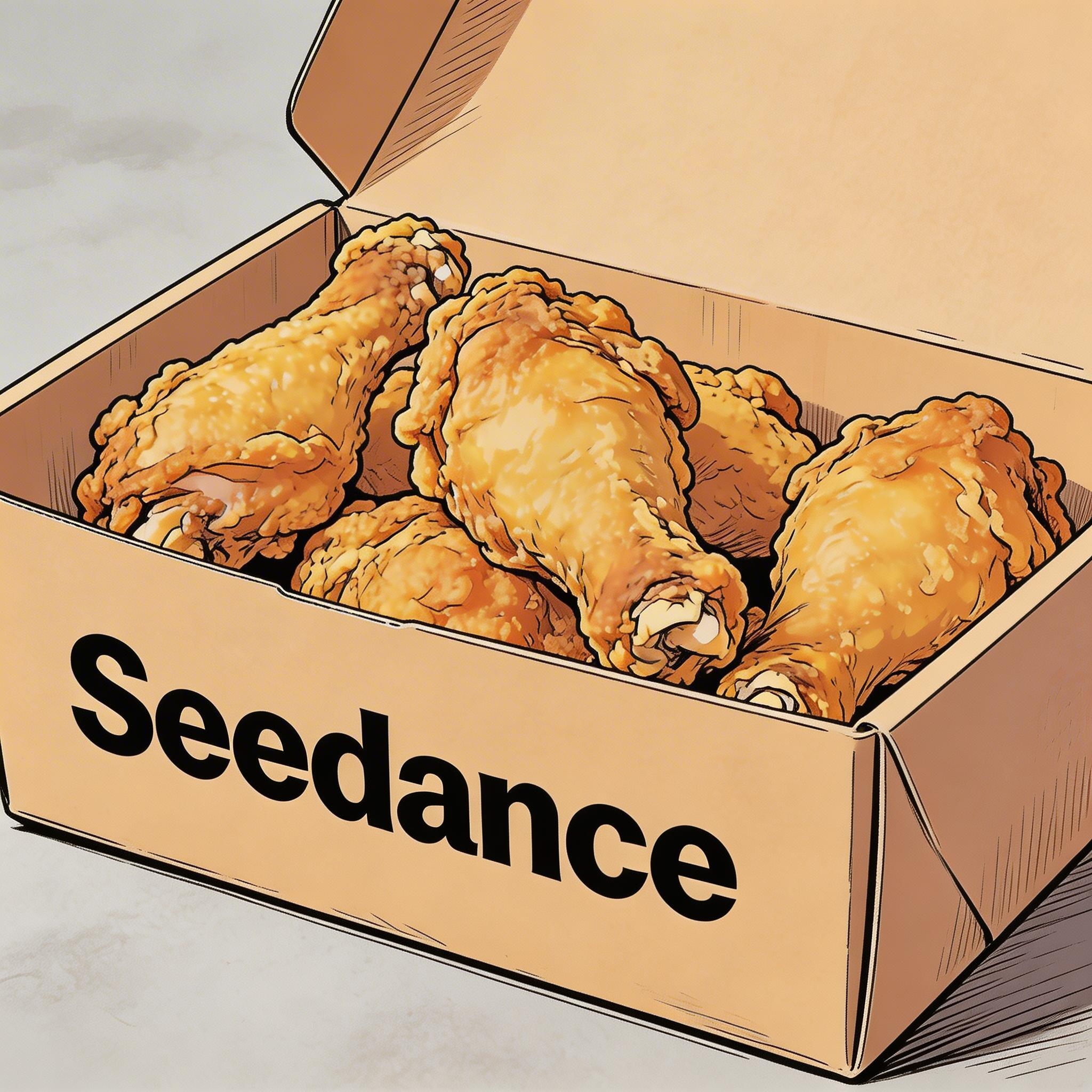
The image below was the only visual input. The prompt described what should happen inside it, and everything else is the model holding on to the original drawing.
Prompt
Hand-drawn comic style, three people sitting together eating fried chicken, cheerful and lively atmosphere.
The uploaded still, the only visual input.
Input image
Result
Seedance output, watermark-free.
Use cases
Image to video is the mode for material that already exists: a product shot, an illustration, a poster, a face.
01
Start from a clean packshot and get a turntable, a pour, or a hand entering frame. Motion that would otherwise need a table-top studio day.
02
A drawing keeps its line and palette while the scene animates, which is why comic and anime frames survive the trip better than most people expect.
03
Give a still portrait a breath, a turn, or a look toward camera. Enough life for an intro frame or a title card.
04
Posters, scanned photos, and old campaign art become moving assets without a reshoot or a fresh rights conversation about new footage.
How it works
Attaching a picture is the whole switch. The composer sees the image and routes the job, so you never pick a mode.
01
Drop one image into the composer and it becomes the first frame. Add a second and it becomes the last frame, so the clip travels between them.
02
Describe the action and the camera rather than the picture. The model can already see the frame; it needs to know what happens next.
03
Output lands in the asset library at full quality with no watermark, and can be attached again as a reference for the next pass.
Jobs people arrive with
These are the jobs people arrive with a picture for, worded the way they ask for them. Each answer says whether it works here, on which model and with what limit, then gives the steps and a prompt you can paste with a still of your own.
01
Yes. Attach the packshot as the first frame, ask for one product move and one camera move, and say that everything else stays as photographed. The still fixes the label, the colours and the shape, so the prompt only has to supply motion. Seedance 2.0 Mini runs it with purchased credits at up to 720p, enough to test the idea; Seedance 2.5 adds 1080p, sound and up to 30 seconds on a paid plan or a credit pack. The content check can refuse inputs that show well-known logos or brands; if it refuses your packshot, try a crop where the logo is smaller or turned away. A refused job is not charged.
How to do it
Prompt
The bottle stays centred while a slow quarter turn reveals its side. Water droplets slide down the glass, a soft band of light sweeps across the label, and the camera pushes in slightly. Background and lighting stay exactly as in the photo.
Settings
Prompt recipe: no clip attached, paste it and run it.
02
The first frame already carries identity, palette and composition, so a short clip with a modest camera move usually holds them; drift starts with long clips and big motion. To hold a face, an outfit or a product through a whole series, switch from a single first frame to a reference group: on the Seedance models three or more stills become references rather than a fixed opening frame, up to 30 on Seedance 2.5 and nine on Seedance 2.0, Fast and Mini, and the prompt names them by number. Human faces are supported: of 6,214 image jobs run here between September 15 and October 14, 2026, only 19 were refused for showing a real person.
How to do it
Prompt
The man in image 1, wearing the jacket from image 2, walks out of a train station into bright morning light, adjusts his collar and looks down the street. Medium tracking shot, then a slow push-in on his face. Keep his face and the jacket exactly as in the images.
Settings
Prompt recipe: no clip attached, paste it and run it.
03
Attach two images and the job becomes a first-and-last-frame clip: it opens on the first picture, lands on the second, and the prompt describes what happens in between. Seedance 2.5, 2.0, Fast, Mini and 1.5 Pro, Kling 3.0 and O3, Veo 3.1, MiniMax H3 and Wan 3.0 take the pair; SeeDance 1 Pro Fast takes a first frame only. It is the way to make transitions, day-to-night changes and before-and-after reveals land exactly, and Seedance 2.0 Mini does it with purchased credits.
How to do it
Prompt
The empty white living room slowly fills with furniture: a sofa slides in from the left, plants grow in the corners, a rug unrolls across the floor and the lamps switch on. Static camera. End on the final frame.
Settings
Prompt recipe: no clip attached, paste it and run it.
04
Yes, and human faces are supported. A scanned print or a painted portrait animates best when the prompt asks for small, natural motion: a blink, a breath, a slight turn of the head, hair moving in a breeze. Big gestures give the face room to drift away from the original. Seedance 2.0 Mini runs it with purchased credits at up to 720p. Refusals for showing a real person were rare here, 19 of 6,214 image jobs between September 15 and October 14, 2026; if a photo is refused, Kling 3.0 in the same picker is a second option, and a refused job is not charged.
How to do it
Prompt
Keep the photo exactly as it is, including its grain and colours. The woman slowly blinks, a gentle smile forms, and she turns her head slightly toward the camera. A light breeze moves a few strands of hair. Static camera.
Settings
Prompt recipe: no clip attached, paste it and run it.
05
Leave the audio switch on and describe the sound in the prompt. Seedance 2.5, 2.0, 2.0 Fast, 2.0 Mini and 1.5 Pro, Kling 3.0, Kling O3 and Wan 3.0 generate audio together with the motion, so a beach photo gets surf and wind and a café photo gets cups and chatter. Spoken lines need quotes and a named speaker. On the Seedance models sound does not change the credit cost; Veo 3.1 and MiniMax H3 have no audio option here.
How to do it
Prompt
Waves roll onto the beach in the photo and pull back over the pebbles, the palm leaves sway, and a gull crosses the sky. Sound of surf on pebbles, wind in the palms, one distant gull call. Slow push-in.
Settings
Prompt recipe: no clip attached, paste it and run it.
What you can generate
Every row is read from the model registry the composer enforces. The inputs column says how a model takes pictures: a single first frame, a first-and-last-frame pair, or a reference group that guides identity without fixing the opening frame. The other columns are the same limits the workspace applies when you press generate.
No model quotes are currently available. Please try again later.
Available models, resolutions and reference formats are shown in the generator. Credit-mode concurrency is 1 for Lite, 4 for Pro and 8 for Premium. A model guide is not a guarantee that every discussed model is currently enabled.
| Plan | Billed amount | Credits | Price per credit |
|---|---|---|---|
| Lite 300 | $14.90/month | 300/month | $0.0497 |
| Lite 300 | $156.00/year | 300/month | $0.0433 |
| Pro 600 | $29.00/month | 600/month | $0.0483 |
| Pro 600 | $174.00/year | 600/month | $0.0242 |
| Pro 1300 | $59.00/month | 1300/month | $0.0454 |
| Pro 1300 | $598.80/year | 1300/month | $0.0384 |
| Pro 2000 | $89.00/month | 2000/month | $0.0445 |
| Pro 2000 | $828.00/year | 2000/month | $0.0345 |
| Premium 3500 | $149.00/month | 3500/month | $0.0426 |
| Premium 3500 | $1188.00/year | 3500/month | $0.0283 |
| Premium 5200 | $219.00/month | 5200/month | $0.0421 |
| Premium 5200 | $2028.00/year | 5200/month | $0.0325 |
| Premium 7200 | $299.00/month | 7200/month | $0.0415 |
| Premium 7200 | $2748.00/year | 7200/month | $0.0318 |
| Credit pack | $29.90 | 350 | $0.0854 |
| Credit pack | $49.90 | 600 | $0.0832 |
| Credit pack | $79.90 | 1000 | $0.0799 |
| Credit pack | $199.00 | 2500 | $0.0796 |
| Credit pack | $999.00 | 13000 | $0.0768 |
Annual plans are billed yearly. Starter credits are valid for 180 days; other standard packs for 365 days. Taxes and personal offers are shown in checkout.
Last updated
Cost in dollars
A first frame or a reference group does not change the Seedance rate, so these jobs cost the same as a prompt of the same length and resolution. The credits come from the calculation the generator bills with, plan discounts included, and the prices from the pricing page.
| Plan | Billed amount | Credits | Price per credit |
|---|---|---|---|
| Lite 300 | $14.90/month | 300/month | $0.0497 |
| Lite 300 | $156.00/year | 300/month | $0.0433 |
| Pro 600 | $29.00/month | 600/month | $0.0483 |
| Pro 600 | $174.00/year | 600/month | $0.0242 |
| Pro 1300 | $59.00/month | 1300/month | $0.0454 |
| Pro 1300 | $598.80/year | 1300/month | $0.0384 |
| Pro 2000 | $89.00/month | 2000/month | $0.0445 |
| Pro 2000 | $828.00/year | 2000/month | $0.0345 |
| Premium 3500 | $149.00/month | 3500/month | $0.0426 |
| Premium 3500 | $1188.00/year | 3500/month | $0.0283 |
| Premium 5200 | $219.00/month | 5200/month | $0.0421 |
| Premium 5200 | $2028.00/year | 5200/month | $0.0325 |
| Premium 7200 | $299.00/month | 7200/month | $0.0415 |
| Premium 7200 | $2748.00/year | 7200/month | $0.0318 |
| Credit pack | $29.90 | 350 | $0.0854 |
| Credit pack | $49.90 | 600 | $0.0832 |
| Credit pack | $79.90 | 1000 | $0.0799 |
| Credit pack | $199.00 | 2500 | $0.0796 |
| Credit pack | $999.00 | 13000 | $0.0768 |
Annual plans are billed yearly. Starter credits are valid for 180 days; other standard packs for 365 days. Taxes and personal offers are shown in checkout.
Measured here
Timed on this site from the moment a job is submitted to the moment the finished clip is ready, across more than 4,700 image-to-video jobs that finished between September 15 and October 14, 2026. These are real waits, not progress-bar estimates, and every row has at least 30 finished jobs behind it.
| Model | Setting picked most often | Median wait | 3 in 4 done within |
|---|---|---|---|
| Seedance 2.0 Mini | 4 s · 480p | 2 min 41 s | 3 min 8 s |
| Seedance 2.5 | 5 s · 720p | 4 min 43 s | 7 min 12 s |
| Wan 3.0 | 5 s · 720p | 3 min 14 s | 5 min 30 s |
| Seedance 2.0 | 5 s · 720p | 3 min 43 s | 5 min 17 s |
| Seedance 1.5 Pro | 5 s · 480p | 1 min 32 s | 1 min 48 s |
| Kling 3.0 | 5 s · 720p | 1 min 51 s | 2 min 32 s |
| Seedance 2.0 Fast | 5 s · 720p | 2 min 49 s | 3 min 20 s |
| SeeDance 1 Pro Fast | 5 s · 480p | 52 s | 1 min 4 s |
Worked examples
The first example is the real pair from the demo above with its unedited prompt. The other two are prompt recipes written against the same models and limits, one with purchased credits and one on Seedance 2.5, so you can paste them in with a still of your own.
01
Before
One hand-drawn, comic-style still of three people sharing fried chicken. It was the only visual input, and the prompt restated the style rather than describing new motion in detail.
After
The same drawing in motion: the characters eat and react while the line work and the palette hold, and the composition stays where the artist put it. This is the clip shown in the demo section above.
Prompt
Hand-drawn comic style, three people sitting together eating fried chicken, cheerful and lively atmosphere.
Settings
02
Before
A clean e-commerce packshot: a ceramic pour-over coffee dripper on a white sweep, front-lit, perfectly still, the kind of image every product listing already has.
After
A five-second clip in which the dripper turns a slow quarter rotation on the spot while a hand enters from the right and pours water, steam rising; the background, lighting and framing stay exactly as photographed.
Prompt
The ceramic dripper rotates slowly a quarter turn on the spot. A hand enters from the right and pours hot water in a thin stream, steam rising. Background, lighting and framing stay exactly as in the image.
Settings
Prompt recipe: no clip attached, paste it and run it.
03
Before
Two stills: a vintage travel poster of a seaside town, and a version of the same poster with the sky darkened and the windows lit, prepared in an image editor.
After
A ten-second clip that travels from the day version to the night version: clouds drift, the sea moves, lights come on one by one, and the clip lands exactly on the second frame because it was pinned as the last one.
Prompt
Slow transition from day to evening over the seaside town. Clouds drift right, waves roll gently, windows light up one by one, the sky deepens to indigo. End precisely on the final frame. Subtle camera push-in, illustrated poster texture preserved.
Settings
Prompt recipe: no clip attached, paste it and run it.
Limits
Knowing the failure modes saves credits and retries. The refusal figures are counted from the image jobs run on this site between September 15 and October 14, 2026.
01
This is the refusal people hit most with a picture. About one image job in seven on Seedance 2.0 Mini and Seedance 2.5 was refused by the content check, and the reason it names most often is copyrighted or trademarked material: a prominent third-party logo, a famous product design, or a character from a film, game or cartoon. Crop the logo out or use your own artwork; describing a style is fine, uploading the character usually is not. A refused job is not charged.
02
The next most common refusal is an input image the check flags as sensitive. Faces themselves are supported: only 19 of 6,214 image jobs here were refused for showing a real person. If a photo keeps being refused on Seedance, Kling 3.0 in the same picker is a second option; it refused none of its 63 image jobs in the same period.
03
The upload must be at least 300 pixels on the short side, and a small or heavily compressed still stays soft even when the output is 1080p. Start from the sharpest version you have; the clip cannot add detail the photo never had.
04
The further the subject moves from the first frame, the more fine detail drifts: faces, hands and small print on a label. Keep the camera move modest, describe one action, or pin the ending with a last frame so the clip has to land on a known picture.
05
Text that is crisp in the still can warp as soon as the product turns or the camera moves. Keep the label facing the camera, or add the lettering on top in your editor afterwards.
06
Crops that cut the subject in half, collages and frames crowded with small objects give the model less to hold on to, and the motion goes where you did not ask for it. One clear subject on a simple background animates best.
Why Seedance refuses prompts, counted on 11,168 jobs, with rewrites
Questions
Choosing an entry
The three scene pages share one composer. What you attach decides the entry, and the model you pick decides the ceiling.
A still is the right entry when the look is already decided and the job is to give it motion. When nothing exists yet and you want to explore quickly, start from text to video and write the shot instead. When you have footage that is almost right, use video to video and describe only the change, so the camera, set and timing you already like stay put.
The model choice is separate from the entry. Seedance 2.5 is the pick when the still has to survive a long clip or travel through several shots, because it holds up to 30 reference images and runs to 30 seconds. Seedance 2.0 Mini is the pick for a quick turntable with purchased credits, and the first-and-last-frame pair works across most of the table when the ending matters as much as the start.
When the clip has to land on a specific picture, attach the closing image as well: first and last frame to video lists the 11 models that take the pair, what each charges per second, and a worked example with both frames and the full instruction.
When the character or product has to appear in a new shot rather than open it, attach the images as references instead: reference to video covers the 7 models that take a reference set, up to 30 images on Seedance 2.5, and how to tag each image in the prompt.
Keep going
A still is one of three ways in. Pick the entry that matches what you already have.
Welcome credits
Drop in one photo, say what should move, and download the take without a watermark. Free credits on a new account.
Animate an image